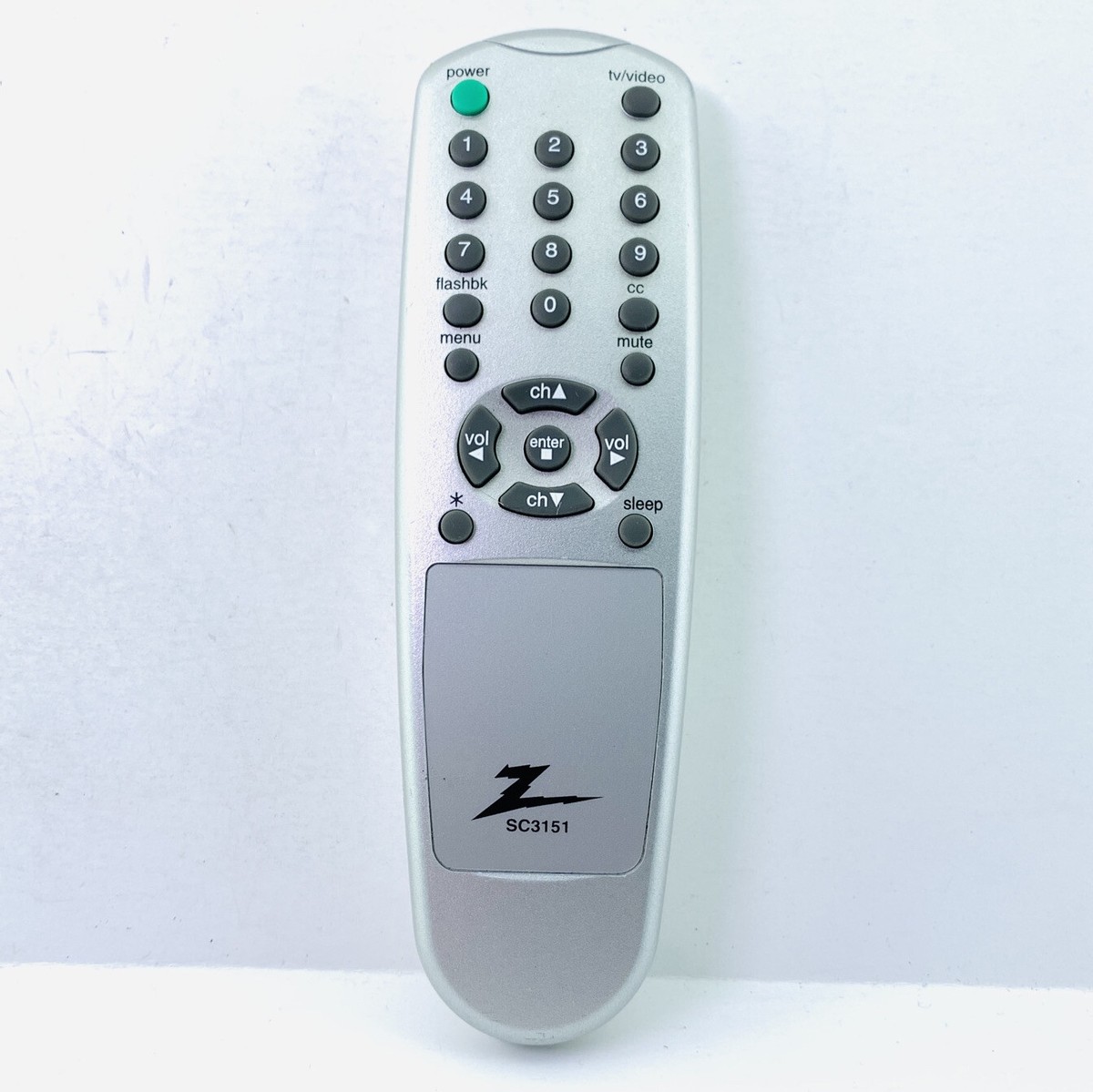
Honestly, most people think of Zenith as a ghost brand. A relic of the 1980s that somehow survived in the back of a dusty cabinet. But if you’re holding a Zenith TV remote control right now, you aren't just holding a piece of plastic; you’re holding a piece of the reason we even have "couch potatoes" today. Zenith literally invented the wireless remote. They called it the "Flash-Matic" back in 1955, and it looked like a literal ray gun.
Fast forward to today. You’ve probably got a flat-screen that says Zenith on it—maybe it’s an old plasma or one of those early LCDs—and the remote just died. Or maybe you're one of the dedicated retro-gaming enthusiasts who still uses a curved-glass CRT for that perfect scanline aesthetic. Whatever the case, getting these remotes to talk to the TV isn't always as simple as "point and click" anymore.
The Secret Life of the Zenith TV Remote Control
Most folks don't realize that Zenith was swallowed up by LG Electronics back in the late 90s. This is actually a huge piece of the puzzle for anyone trying to fix or replace a remote. If you can’t find a specific Zenith TV remote control, an LG remote will almost always work for the basic functions. Power. Volume. Channel.
It's weird how specialized these things were. Back in the day, Zenith remotes had names like "Space Command." They didn't even use infrared light at first. They used ultrasound. If you pressed a button, a tiny hammer struck a metal rod inside the remote. The TV "heard" the pitch and changed the channel. It’s why your grandma’s TV might have changed channels if she jingled her car keys too close to it.
But you're probably dealing with the infrared (IR) versions. These are the ones with the little bulb on the end. If yours isn't working, the first thing to check—and I know this sounds patronizing, but stay with me—is the battery terminals. Not just the batteries. Zenith remotes from the early 2000s were notorious for slight battery leakage that creates a thin, invisible film of oxidation on the springs. Take a Q-tip with a tiny bit of white vinegar or lemon juice and scrub those contacts. It’s a 30-second fix that saves twenty bucks.
Programming the Universal Beast
If you've lost the original and bought a generic "jumbo" remote from a drugstore, you’re in for a fun evening of "code hunting." This is where most people give up. Zenith codes are usually 000, 004, 005, or 101. But here's the catch: the code depends entirely on the brand of the remote, not just the TV.
If you're using a GE universal remote, the Zenith code might be 0301. If it's a RCA, it might be 1004.
The "Auto-Search" function is your friend here, but it's tedious. You sit there, pointing the remote at the TV, hitting the "Power" button over and over until the screen finally blinks off. It feels like a low-stakes version of a safe-cracker in a heist movie.
Why Your "New" Remote Won't Access the Menu
This is a massive pain point. You buy a replacement Zenith TV remote control online. It looks right. The Power button works. The volume works. But you can't get into the "Settings" or "Input" menu to hook up your Nintendo Switch or cable box.
Why? Because Zenith (and later LG) used a specific proprietary signal for the Menu function that many "universal" remotes just don't replicate correctly. This is especially true for the "MBR" or Multi-Brand Remotes that came with old cable boxes.
If you’re stuck in this loop, look for a "Learning" remote. These are different from "Universal" remotes. A learning remote can actually "listen" to the signal of another remote. Of course, that requires you to have the original working remote, which... if you did, you wouldn't be buying a new one. Life is unfair like that.
The Phone App Alternative
Wait. Before you spend money on a replacement Zenith TV remote control, check if your phone has an "IR Blaster." Most modern iPhones don't. Samsung dropped them years ago. But if you have an older Android phone—like a Galaxy S6 or a Xiaomi—you actually have a built-in remote control.
Download an app called "AnyMote" or "Peel Smart Remote." Since Zenith shares a database with LG, these apps are incredibly reliable. It’s a great temporary fix while you wait for a physical replacement to arrive in the mail.
Troubleshooting the "Ghost in the Machine"
Sometimes the remote isn't broken, but it’s acting like it is. You press "2" and it types "222." This is called "button chatter." Inside the Zenith TV remote control, there's a rubber membrane with conductive pads. Over a decade or two, the oil from your skin seeps through the buttons and creates a sticky residue on the circuit board.
You can actually fix this yourself. Pop the case open—usually one screw in the battery compartment and then a lot of prying with a flathead screwdriver. Wipe the green circuit board down with 90% isopropyl alcohol. Let it dry. It’ll feel like brand new.
Real Talk: Is it Worth Replacing?
If you have a 20-year-old Zenith CRT, the remote is essential for adjusting things like the "Service Menu" (the hidden settings used to fix screen tilt or color bleeding). For these, don't buy a generic remote. Go to eBay and find an "Original Equipment Manufacturer" (OEM) remote. They usually have model numbers like Zen-757 or 800-series.
For the newer Zenith flat screens, just buy a cheap LG remote. Seriously. They are better built, the buttons don't stick as much, and the IR frequency is identical. Zenith effectively stopped being a "unique" hardware entity in the mid-2000s.
Moving Forward With Your Zenith Setup
Don't just throw the remote in the trash if it's acting up. These older devices were built to be modular, unlike the glued-shut tech we have now.
- Check for "IR Light": Point the remote at your phone’s front-facing camera (the selfie one). Press a button. If you see a flickering purple light on your phone screen that you can’t see with your naked eye, the remote is sending a signal. The problem is the TV's sensor, not the remote.
- The "Power Cycle" Trick: Take the batteries out. Hold down the "Power" button on the remote for 30 full seconds. This drains the capacitors. Put fresh batteries back in. You’d be surprised how often this resets the internal microchip.
- Verify the Model: Look at the sticker on the back of the TV. If it says "Z" followed by a string of numbers, search specifically for that model number + "remote" on specialized sites like Remotes.com rather than just Amazon. Amazon is flooded with "one size fits all" remotes that often miss the one specific button you actually need.
If you’ve done the alcohol cleaning and the power cycle and you still get nothing, it’s time to move on. The hardware inside these remotes—specifically the ceramic resonator—can crack if the remote is dropped onto a hardwood floor one too many times. At that point, the "brain" of the remote is literally out of sync. Grab a compatible LG replacement and get back to your show.